And the light was on!#
After seeing, electrical installation of a Shelly-25, its docking system , we’re ready to fly!
Objectives#
Control the logical state (on or off) of a Shelly-2.5 module via the Node-RED Dashboard.
The dashboard button will respect the logical state of the physical switch. Action on either the logic button or the physical switch, alternately or consecutively, should change the logical state of the lighting:
| logical state | Action | Logical Result |
|---|---|---|
| 0 | 1 | 1 |
| 1 | 1 | 0 |
The dashboard should feature:
- Logic button
- Status indicator: *on / off
- Module temperature
- 24h00 temperature history: serial chart
Prérequis#
- A Node-RED platform
- Service Mqtt installed
- Have installed the node set node-red-shelly
- Have installed the node set node-red-contrib-ui-led-fork
Interfacing#
http#
A Shelly-2.5 module embeds a mongoose web server. If we address the module via a web browser to the URL http://192.168.1.11/status we will obtain the following information:
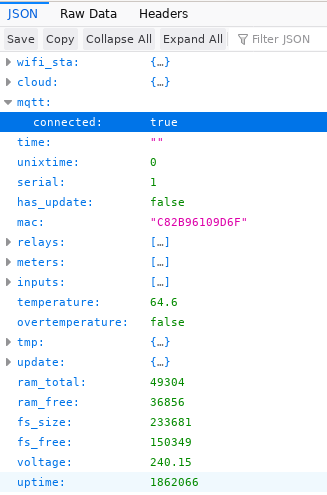
The resulting web page provides all the information managed by the shelly module, including the logic status of both relays.
Flow http#

The flow above does the same thing and retrieves an object that can be used to send information to the Debug output.
What happened?
- The inject node sends an empty payload
- The http request node makes a POST request to the url http://192.168.1.11/status
- The debug HTTP node displays the result of the request
json code of the above flow:
[{"id":"725ce254.81991c","type":"inject","z":"2f348397.b329dc","name":"","topic":"","payload":"","payloadType":"str","repeat":"","crontab":"","once":false,"onceDelay":0.1,"x":170,"y":80,"wires":[["b2981ec3.bd8d48"]]},{"id":"b2981ec3.bd8d48","type":"http request","z":"2f348397.b329dc","name":"","method":"POST","ret":"txt","paytoqs":false,"url":"http://192.168.1.11/status","tls":"","persist":false,"proxy":"","authType":"","x":360,"y":80,"wires":[["8695a15e.1b3a1"]]},{"id":"8695a15e.1b3a1","type":"debug","z":"2f348397.b329dc","name":"HTTP","active":true,"tosidebar":true,"console":false,"tostatus":false,"complete":"true","targetType":"full","x":550,"y":80,"wires":[]}]
It’s not stupid to think that sending a 0 or 1 command to relay_0 will control the lighting line; implementation of case-1.
Flow Mqtt#
As presented in the configuration in the Shelly-2.5 module section, the module can be managed via Mqtt. Simply subscribe to the shellies/shellyswitch25-IdModule/relay/0/command publication, where 0 is the relay number to be addressed.
To obtain the information that can be collected, simply subscribe to the module 2.5 root publication: shellies/shellyswitch25-IdDModule/#.
The # here refers to all elements.
Flow:

JSON code of the flow:
[{"id":"7de404ce.4b65a4","type":"mqtt in","z":"b78563f8.81598","name":"Shelly25 - Status","topic":"shellies/shellyswitch25-IdModule/#","qos":"2","datatype":"auto","broker":"369fc55c.9aa39a","x":450,"y":320,"wires":[["bba75ca8.c09658"]]},{"id":"bba75ca8.c09658","type":"debug","z":"b78563f8.81598","name":"mqtt_Shelly-Output","active":true,"tosidebar":true,"console":false,"tostatus":false,"complete":"true","targetType":"full","x":700,"y":320,"wires":[]},{"id":"369fc55c.9aa39a","type":"mqtt-broker","z":"","name":"mqtt.home.local","broker":"192.168.1.1","port":"1883","clientid":"","usetls":false,"compatmode":true,"keepalive":"60","cleansession":true,"birthTopic":"","birthQos":"0","birthPayload":"","closeTopic":"","closePayload":"","willTopic":"","willQos":"0","willPayload":""}]
Try to retrieve the information by searching the Debug area and unfolding all the objects you’ve collected.
Implementation#
At this stage, the importance of choosing the Shelly module’s operating modes had not been properly understood.
Particularly the switch mode, which combined with a lack of knowledge of the available keywords, including the toggle instruction, led to the creation of this function, which is already present on the module.
Case 1, below.
Case 1: management via HTTP POST#
The difficulty here is to make the Shelly module work like a switch: whatever physical or logical button gives the instruction, the other must be able to switch the light on or off immediately.
The toggle principle!
Suggested algorithm:
- Send a post request to the shelly node
- retrieve module status 0 or 1
- TEST :
- IF 1 –> Modify msg object and set payload to 0
- SI 0 –> Modify msg object and assign value 1 to payload
- TEST :
- Send instruction to node 0 or 1
- Display output in Debug (Output) node
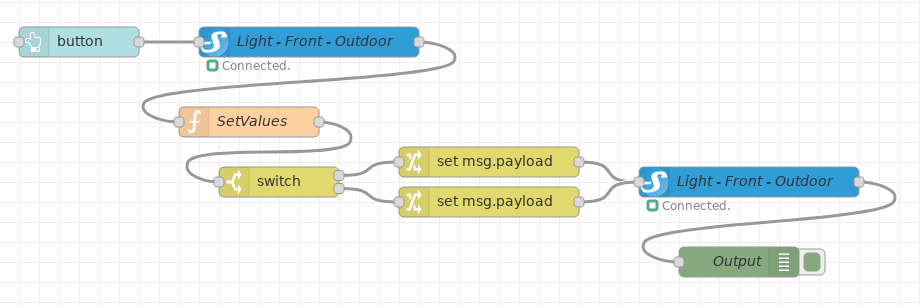
The corresponding flow:
Code for SetValues function:
context.set('value', context.get('value')||false);
var value = context.get('value');
switch (value) {
    case true:
        context.set('value', false);
        msg.payload = false;
        break;
    case false:
        context.set('value', true);
        msg.payload = true;
        break;
    }
return msg;
Associated json code:
[{"id":"725ce254.81991c","type":"inject","z":"2f348397.b329dc","name":"","topic":"","payload":"","payloadType":"str","repeat":"","crontab":"","once":false,"onceDelay":0.1,"x":170,"y":80,"wires":[["b2981ec3.bd8d48"]]},{"id":"b2981ec3.bd8d48","type":"http request","z":"2f348397.b329dc","name":"","method":"POST","ret":"txt","paytoqs":false,"url":"http://192.168.1.11/status","tls":"","persist":false,"proxy":"","authType":"","x":360,"y":80,"wires":[["8695a15e.1b3a1"]]},{"id":"8695a15e.1b3a1","type":"debug","z":"2f348397.b329dc","name":"HTTP","active":true,"tosidebar":true,"console":false,"tostatus":false,"complete":"true","targetType":"full","x":550,"y":80,"wires":[]}]
What happened?
Flow answers the algorithm:
- The Button node sends the POST request to the Shelly" node.
- The Shelly node (our connected hardware) returns the module status ison = true / false.
- The Function SetValues node collects the logical state of the lighting line and formats the msg for the next node.
- The switch node assigns the msg to the correct output (next node), depending on the test performed.
- The change switch node (inverts) the value true / false.
- The Shelly node sends the true / false instruction.
- The Debug node displays the module’s logical state true / false.
Case 2: Management via Mqtt#
Lighting control#
At this stage, the switch operating mode is understood, and the toggle instruction mastered.
Configured in switch mode, the Shelly-2.5 module perceives any action on the physical switch as a toggle instruction.
Suggested algorithm:
- If action on dashboard button
- Publish via Mqtt the toggle instruction on the shellies/shellyswitch25-IdModule/relay/0/command channel.
- The module listening on the shellies/shellyswitch25-IdModule/relay/0/command channel receives the instruction to change logic state (on/off).
The flow:

What happened?
- The dashboard Button node sends the toggle instruction.
- The module reacts and changes its logical state: the lighting line turns on or off.
The use of the Mqtt protocol facilitates the traceability of processing chains via publication/subscription channels.
This mode is systematically preferred.
Lighting status control#
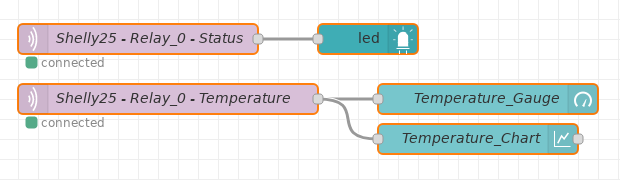
Proposed algorithm:
- Logical state of the lighting line
- Listen on publication channel shellies/shellyswitch25-IdModule/relay/0
- Display On / Off status information
- Module temperature status
- Listen on shellies/shellyswitch25-IdModule/temperature publication channel
- Display temperature gauge in °Celsius
- Display history in series format
Proposed flow:
Result:
| Off | On |
|---|---|

|

|
The JSON flow code will not be presented in this article.
The Dashboard part being a subject in its own right, a future article will deal specifically with it. Creating a dashboard, dividing it into several sections, arranging the elements…
To go further…#
This post has presented the control of a lighting line / point. As soon as we have the equipment, we’ll move on to the creation of specific automation scenarios, which can be linked to :
- Motion sensor
- Brightness sensor
- Lighting ambience
- Location and sunset/sunrise
- (…)